

Nexu · AI agent
Ask your way. Nexu gets it done.
An agent inside your panel, backed by a team of specialists. He builds courses, offers and automations, and every change only counts after you click Confirm.
- Every change needs your OK
- 9 specialists plus Nexu
- 250+ panel tools
Nexu
Your assistant at Academy
Sample answers, no AI and no real data. Nothing is saved.
Nexu
Hi! I'm Nexu. Type a request for your school or tap a suggestion.
Try a request
Nexu can make mistakes. Check before publishing.
What he does
One request, your whole school within reach
Nexu uses the same tools you use in the panel. She just saves you time: she reads, builds and leaves everything ready for you to review.
Courses and lessons
From an empty course to one ready to publish.
- Creates a course with modules, lessons and quizzes in one go, as a draft
- Duplicates lessons and modules and links videos from the Academy Player library
- Builds the members area, the community, certificates and gamification
Example request: “Create a 3-module course about photography.”
Offers and checkout
Price, coupon and extras without opening ten screens.
- Creates a product and a price, upfront or in installments
- Creates coupons, order bumps and upsells
- Pauses and resumes sales and adjusts affiliates and commissions
Example request: “Change the course price to R$ 197 upfront or 12x.”
Students and enrollments
Who joined, where they stopped and who needs access.
- Lists students and shows each one's progress
- Registers, enrolls and organizes cohorts and access groups
- Works in batches of up to 500 people, with the count confirmed by you
Example request: “Put Bruno Reis in the VIP group.”
Sales and reports
Your school's numbers in one sentence.
- Answers how many sales, orders, refunds and subscriptions you had
- Shows wallet balance and statement, P&L and cash flow
- Reads the engagement reports and explains what changed
Here he only reads. He does not move money.
Example request: “How many sales did I make this week?”
Support and community
Less queue for you, faster answers for students.
- Shows the open tickets and updates their status
- Moderates lesson comments and community posts
- Writes announcements for your class, as drafts
In the Inbox he suggests the reply. You are the one who sends it.
Example request: “Which tickets are open?”
Growth
Contacts, pipeline and automations in the same request.
- Finds contacts, applies tags and moves deals in the pipeline
- Builds automations and campaigns as drafts and validates them before publishing
- Creates forms and booking slots and reads the results of your ads
Requires the Growth add-on on your plan.
Example request: “Whoever abandons the cart gets an email in 1 hour.”
The team of specialists
Nexu calls whoever knows the subject
You talk to Nexu. He reads the request and hands the conversation to the specialist for that area, and the panel shows the handoff. They all follow the same rules and the same confirmation.
Nexu
Front door
Receives the request, understands the subject and calls the right specialist. He also handles plan, settings, team and domain.
Example request: “I want my course ready to sell.”
Mentor
Courses and members area
Builds courses, modules, lessons and quizzes, the members area, certificates, gamification, community and access groups.
Example request: “Create a 3-module course about photography.”
Hermes
Sales and checkout
Handles products, prices and installments, coupons, order bumps, upsells, affiliates and the checkout.
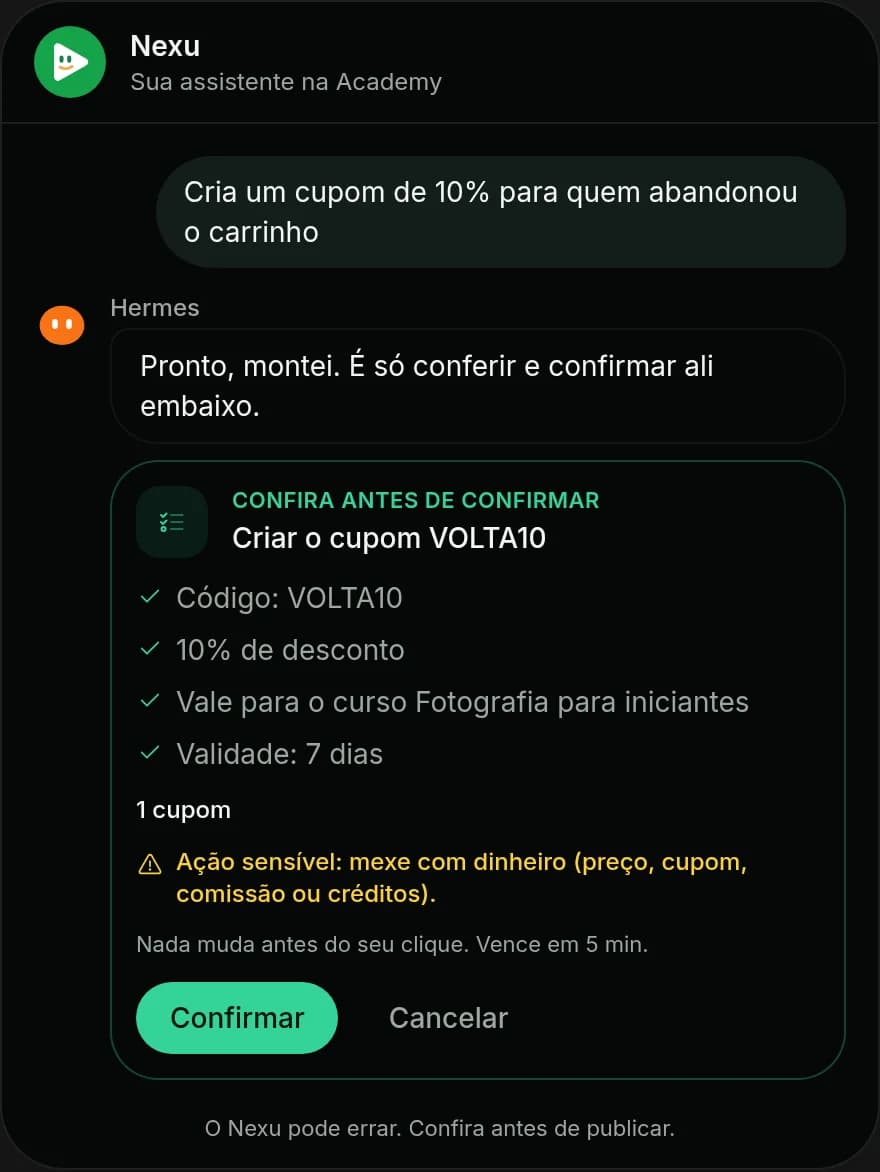
Example request: “Create a 20% coupon for the launch.”
Dédalo
Automations
Designs Growth automations: trigger, waits, messages and tags. Builds them as drafts and validates before publishing.
Example request: “Whoever abandons the cart gets an email in 1 hour.”
Kairós
CRM and sales
Handles contacts, tags, the sales pipeline, campaigns and scheduling.
Example request: “Which deals have been stalled the longest?”
Héstia
Support
Handles the Inbox, channels, the school's AI attendant and student tickets. In the Inbox she suggests the reply and you send it.
Example request: “Which tickets are open?”
Têmis
Finance
Reads sales, orders, balance, statement, refunds and payment failures, and explains the numbers with period and source.
Example request: “Give me a summary of this month's finances.”
Fama
Ads
Shows spend and results of the campaigns in your connected ad accounts and helps with ad ideas.
Example request: “How are my ads doing?”
Apolo
Pages and funnels
Handles sales and capture pages, funnels, forms and the copy of each page.
Example request: “Help me create a sales page.”
Strategi
Strategy
Plans before building: launch, campaign, funnel and automations, with goals drawn from your numbers. Hands the plan to whoever builds it.
Example request: “I want to sell more, help me build a plan.”
Always asks for confirmation
You approve before any change
Everything Nexu writes becomes a card. You read what will change and only then click Confirm. If you don't click, nothing changes.
- What changes, in plain wordsThe card shows the title, the items and how many people or items are affected. No codes and no technical terms.
- Warning on sensitive actionsPublishing, changing people's access, touching a price or coupon and deleting all get a highlighted warning.
- Valid for 5 minutesThe card has a deadline and can only be used once. Expired? Nexu builds it again.
- Undo when possibleIn some cases, such as a course created in one go and changes to the members area, the result comes with an Undo button.
Limits and safety
Rules that protect your school
These rules apply to Nexu and to every specialist.
He doesn't write to your students on his own
He doesn't send messages to students or contacts by himself. In the Inbox he only suggests the reply. Mass campaigns only go ahead after the channel, template and consent check, and with your card.
He doesn't move money
Balance, statement, withdrawals and refunds he only reads. He doesn't withdraw, refund or charge anyone. Prices and coupons change with a highlighted warning.
Batches with an exact count
Enrolling or importing people: up to 500 per request. Above 50, you confirm the exact number. A campaign to more than 500 people asks you to type a phrase on the card.
Personal data protected
Email, phone and ID are removed before reaching the AI model. After looking up student data, he writes nothing in the same request.
He respects each person's role
He only reaches what the requester's role allows. Someone without access to Finance doesn't see Finance through Nexu either.
Outside text doesn't give him orders
Text you paste, a page or an email he reads is treated as data, never as an order.
Nexu can make mistakes. Check the cards before confirming and review whatever you publish.
Plans and usage
Where Nexu is available
Only what the product shows today.
From the Campus plan
Nexu is part of the plans with an AI agent, from Campus up. On Start he shows up locked, with an invitation to upgrade.
Growth is an add-on
The Growth tools (contacts, pipeline, automations, campaigns and ads) require the Growth add-on. The others work without it.
Usage limit
Each school has a daily and monthly limit on Nexu usage. If it is reached, Nexu says so and answers again in the next period.
Prices and limits for each plan are on the plans page.
Frequently asked questions
About Nexu
Does Nexu publish things on his own?
No. Every change becomes a card and is only saved after you click Confirm. A course built by Nexu starts as a draft.
Is the demo on this page the real Nexu?
It is a sample script, with no AI and no real data. It shows the path: request, specialist, card and result. In the panel, Nexu understands requests in your own words.
Who can use Nexu and on which plans?
Owners and team members with AI permission, on plans with an AI agent, from Campus up. Each person only reaches what their role allows. The Growth tools require the Growth add-on.
Does he talk to my students?
Not on his own. The one that answers students' questions about the content is the AI Tutor, which is a separate feature.
Can I undo?
In some cases, yes: a course created in one go and changes to the members area come with an Undo button. For the rest, Nexu doesn't promise to undo. That is why the card exists.
Do I need to know technology?
No. You ask in your own words and he answers without code and without technical names.
Ask. Review. Confirm.
Nexu does the building. The decision stays with you.
Start free on Start · Nexu from Campus