

Pages and Offer Modeler
Pages that sell, in the same panel.
Build the sales page with blocks, start from a template, upload a ready-made site or ask Nexu to model an offer that works. All connected to the checkout and the members area.
- Block editor
- Ready-made site as .zip
- Offer Modeler
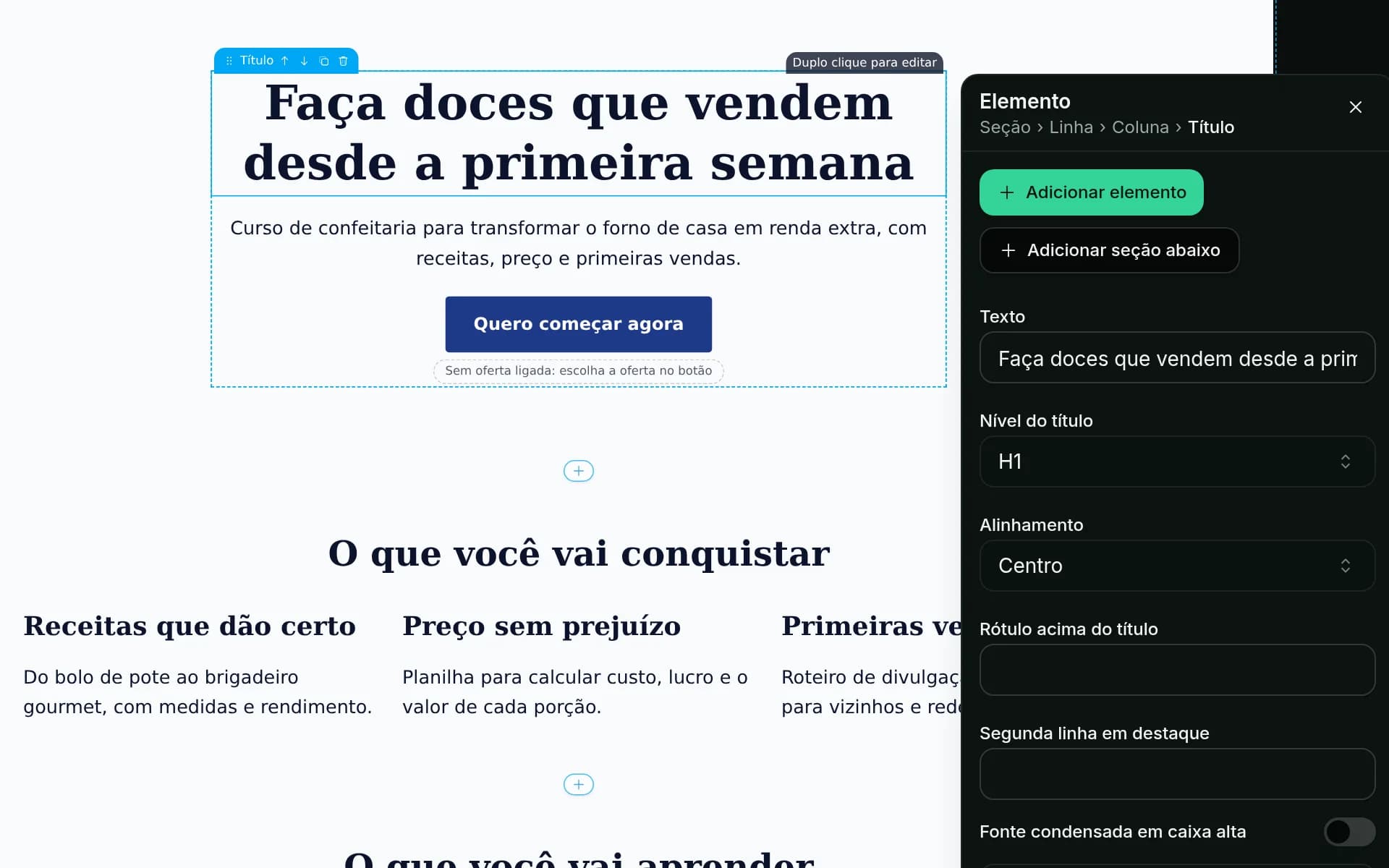
Block editor
Build the page with blocks, no code.
Each page is a stack of sections. You edit the text right on the screen, adjust colors and fonts and check how it looks on desktop, tablet and phone.
- Start from scratch, from a ready-made template or by importing an .html or .zip file.
- Section gallery: cover, benefits, testimonials, offer, guarantee, FAQ and more.
- Ready-made color and font styles, one click to switch.
- Buttons and prices linked to the checkout offer. The price comes from the offer and is never typed by hand on the page.
- The page saves itself, keeps the published versions and lets you go back to an old one.
- Before publishing, Academy checks the offer, form, links and search data.
- Secret preview link so someone can review the draft before it goes live.
- Results per page: visits, unique visitors, average time and paid sales.
Every screen of the journey
Sales, capture, thank you and the student screen.
The Pages tab gathers everything your students and customers see, each screen in its place.
Sales page
Cover, benefits, course outline, testimonials, offer, guarantee and FAQ, linked to the product and the checkout offer.
Free page
Thank you, free lesson, terms, live event, waitlist and more, each at its own address, with search settings and tracking per page.
Lead capture
Headline, benefits and form on one page. The contact goes to the CRM. Part of the Growth module.
Student home
The members area storefront, with your school's look, edited in the same place.
Login screen
The sign-in screen of each members area, with templates that use images.
Checkout
A product checkout: price, payment methods and template, adjusted in Customize.
Offer Modeler
Show an offer that works. Nexu models it, never copies it.
Paste the link of a page you admire, its text or up to 3 screenshots. Nexu understands why it sells and writes the page for your product, with new text.
Show the reference
Paste the link, the page text or upload up to 3 screenshots. If the link does not open, paste the text.
Pick your product
Say who it is for, what people get and which real proof you have.
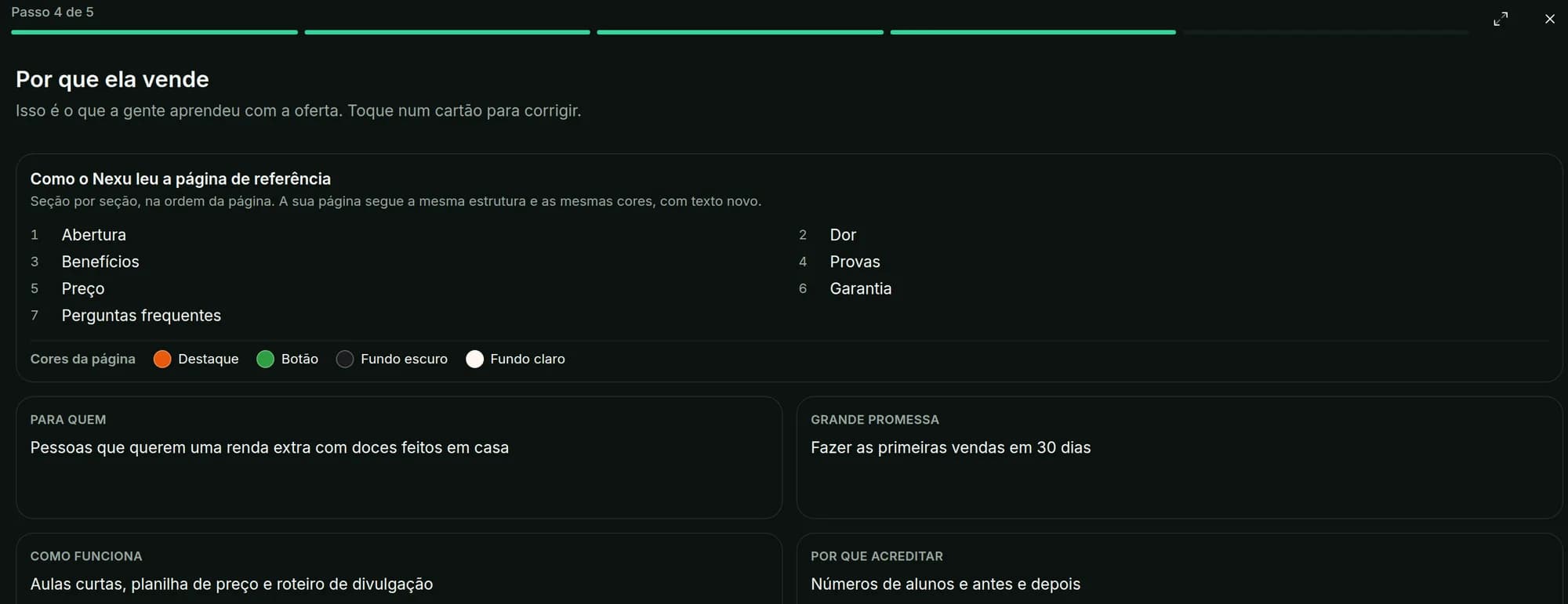
See why it sells
Nexu shows audience, promise, how it works, proof, objections, bonuses, guarantee and section order. Tap a card to correct it.
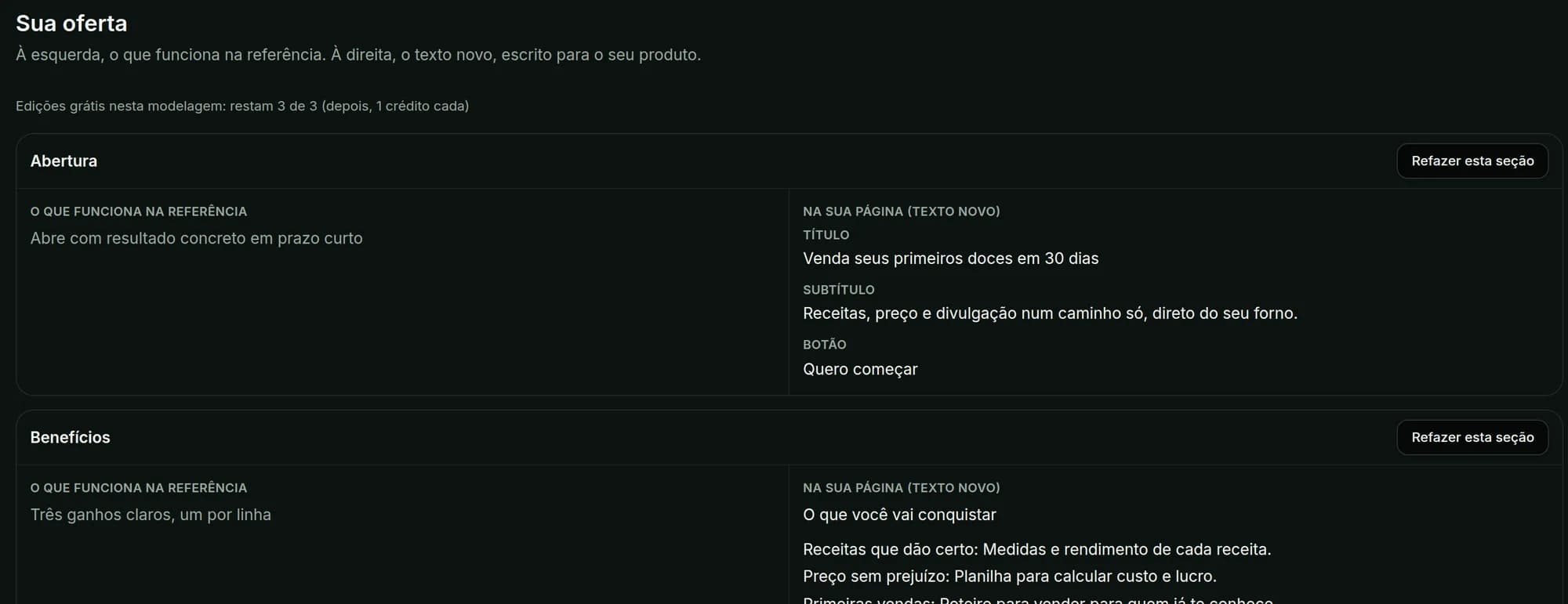
Get your version
On the left, what works in the reference. On the right, new text written for your product. Redo only the section that did not turn out well.
Open it in the editor
The result becomes a sales page draft. Nothing goes live on its own.
Modeling is not copying
The reference is only used to understand what makes it sell. Its texts, images, brands, names and testimonials never reach your page. Before you start, you confirm the product is yours.
- Testimonials and proof become spaces for you to fill with real data.
- A passage that ends up too close to the reference also becomes a blank space for you to write.
- The suggested offer (price, anchor price, bonuses and guarantee) only goes to the Checkout when you confirm.
What it costs
A modeling run uses 2 AI credits. They are reserved when Nexu starts and only charged if it works. If it fails, they go back to your balance.
The first 3 section edits in each modeling are free. From the fourth on, each one costs 1 credit.
Ready-made site
Already have a site? Upload the .zip and publish.
For pages built in another tool. You upload the site folder, check the warnings and publish at an address of your school.
Prepare the file
Build the site and compress the final folder into a .zip of up to 25 MB. The index.html must be at the root.
Upload and check
Academy reads the file and shows warnings: absolute links, cookies, offline mode, password or card fields.
Publish at your address
Pick the address and, if you like, link the site to a product. Each upload becomes a version: save without publishing, publish or take it down.
What Ready-made site accepts
- HTML, CSS, JavaScript, images, fonts and data.
- Up to 25 MB in the .zip. Each file up to 10 MB and at most 2,000 files.
- Programs and server scripts are refused.
- To sell, use the Academy checkout. Card fields on the site raise a warning.
Short links
One link for each place you promote.
Create a short link for your Instagram bio, WhatsApp group, email, ad or a printed QR code, and see how many clicks each one got.
Goes where you want
A free page, a sales page, a checkout, a form or an outside address. Pick the end of the link or let Academy create one.
Source in your reports
Pick the channel and the source of each visit shows up in your reports.
QR code
Download the link's QR code as SVG to print.
You stay in control
Set an expiry date, turn the link off and on again and see the clicks and the last click.
Plans and credits
What needs a bigger plan.
The editor and short links are the base. A few features ask for a plan or a module.
- Campus
Importing an HTML page.
- Legacy
Offer Modeler, Ready-made site and the premium templates and sections.
- Growth module
Lead capture pages, together with contacts, funnels and automations.
The Modeler uses AI credits. Plan credits renew every month and you can buy extra credits.
See plans and modulesFrequently asked questions
Questions about pages and the Modeler
Does the Modeler copy the reference page?
No. It uses the reference only to understand what makes it sell. Its texts, images, brands, names and testimonials never reach your page.
Does Nexu publish the page on its own?
Never. The result is a draft in the editor. You review it, pick the offer and publish. The offer only goes to the Checkout when you confirm.
What if the reference link does not open?
Paste the page text or upload up to 3 screenshots in PNG, JPG or WebP, up to 3 MB each.
What happens to my credits if the modeling fails?
They are reserved at the start and only charged if it works. If it fails, they go back to your balance.
What is the difference between a free page and a Ready-made site?
A free page is built in the Academy editor. A Ready-made site is built elsewhere: you upload it as a .zip and Academy publishes it as is.
At what address does the page go live?
At the path you choose, inside your school's address. Pages with a single-level path can also answer at the root of the domain.
Do I have to confirm the testimonials to publish?
Yes. To publish, you confirm that the testimonials on the page are real and authorized by the students.
Build your product's page.
Create your school, open the Pages tab and start from a template.
Start on the Start plan, no monthly fee.