

Finance module
Your school's money in one place.
See how much you have in cash, what is due and what was left over in the month. Accounts payable and receivable, cash flow, P&L and overdue collections, connected to your checkout sales.
- Cash flow and P&L
- Payable and receivable
- Overdue collections
Overview
The numbers that matter, as soon as you open the screen.
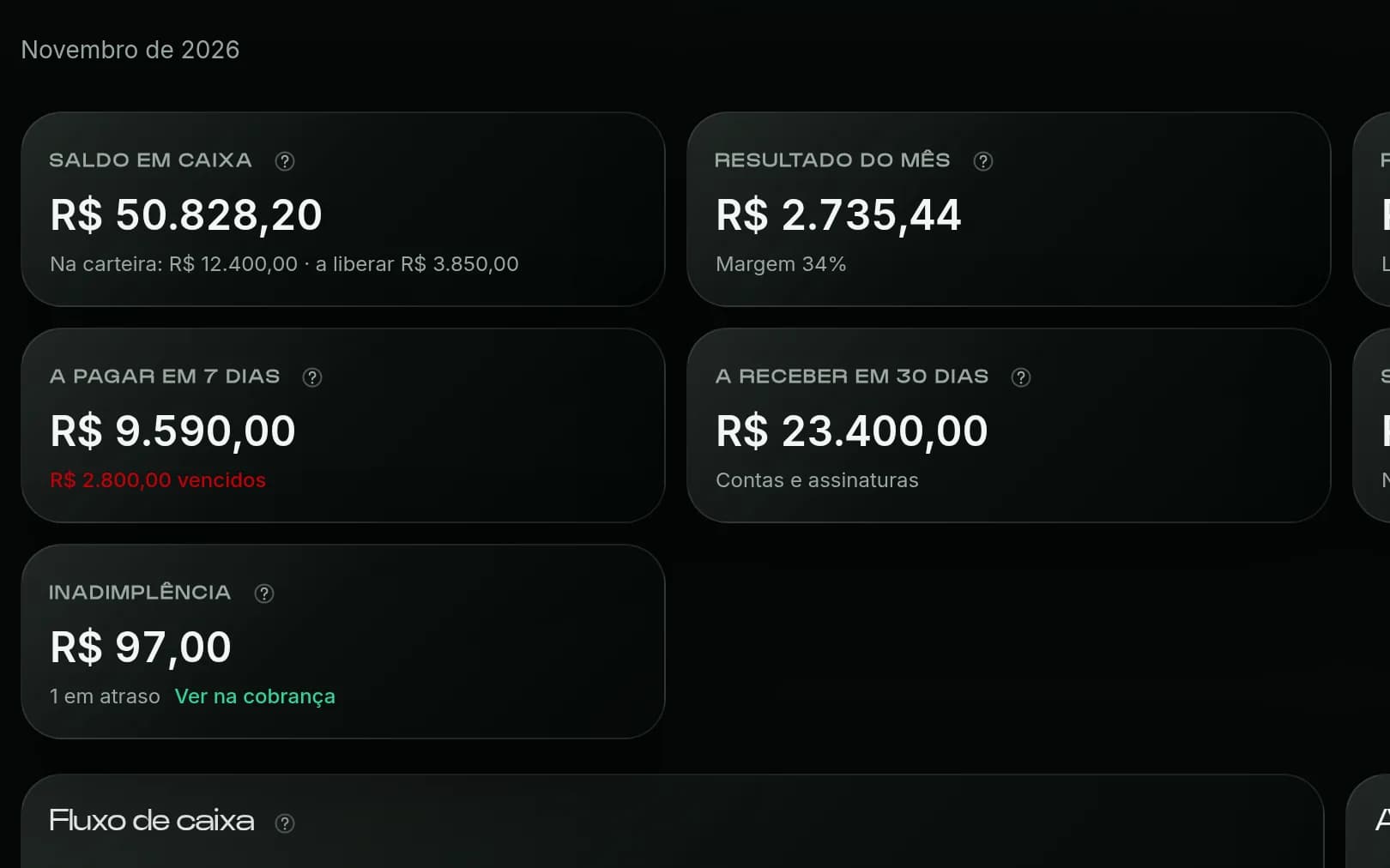
The overview brings together sales, bills and subscriptions. Checkout sales come in on their own, with no entry needed.
Cash balance
Starts from the opening balance you enter and adds net sales and the bills paid and received.
Result of the month
The same number as the cash-basis P&L, with the margin over revenue.
Gross revenue
What you sold in the month and what is left after refunds.
Payable in 7 days
What is due this week, with the overdue amount highlighted.
Receivable in 30 days
Accounts receivable and expected subscription renewals.
Forecast balance in 30 days
Warns you of the day the balance would turn negative, before you get there.
Alerts of the day
- Overdue bill and upcoming due date.
- Balance that would turn negative in the next days.
- Expense without a category.
- Overdue student charge.
- DAS reminder, for those who set the Simples or MEI tax regime.
Accounts payable and receivable
Every bill, with the due date in sight.
Enter what you pay and what you receive outside the checkout. The new bill wizard asks for the type, amount, date, category and supplier.
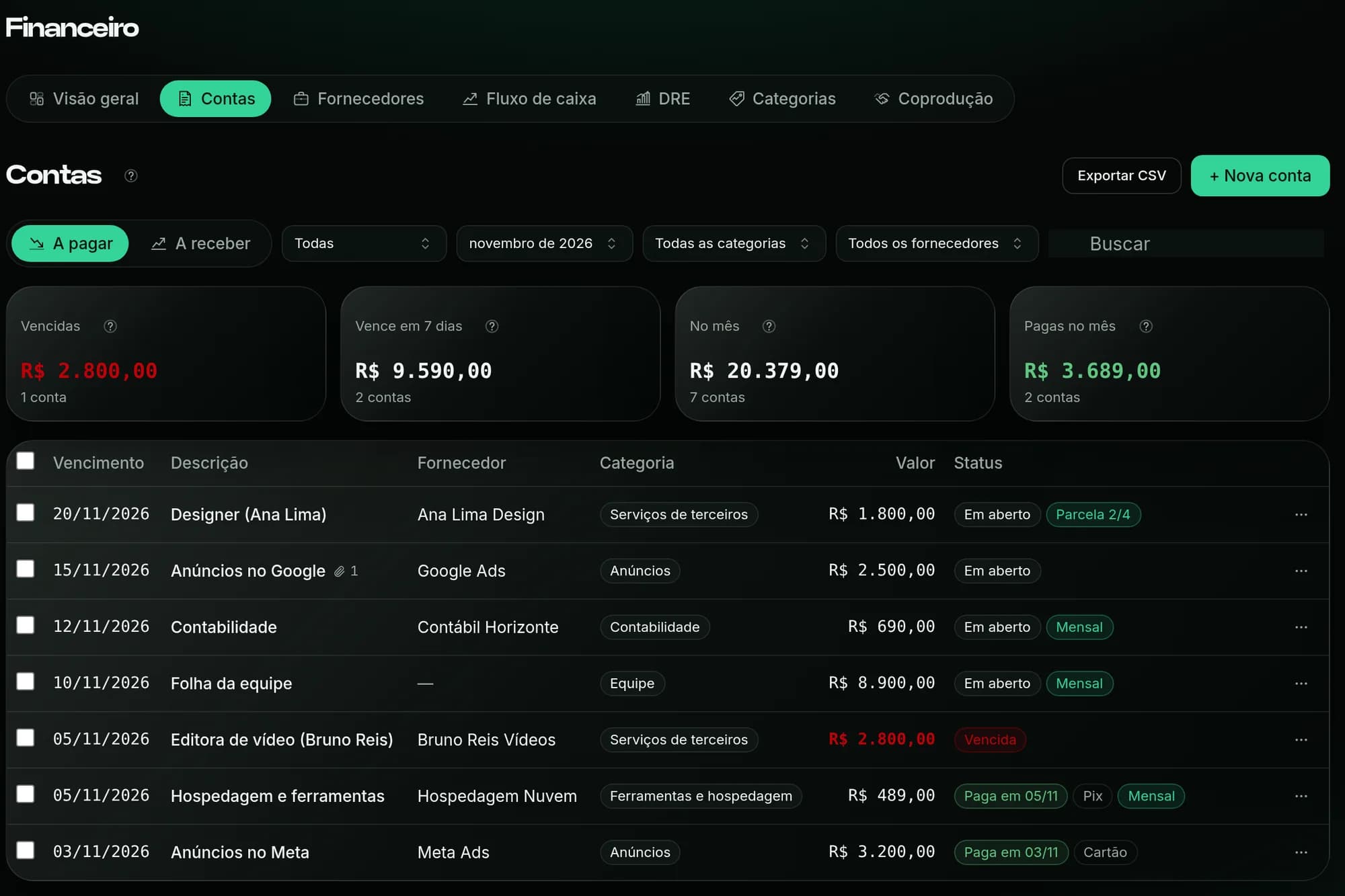
- A bill that repeats every month, every year or in installments: the wizard creates the next ones at once.
- Attach the boleto or the invoice to the bill.
- Mark it as paid with the date and amount paid, including interest, fines or discounts.
- Filter by status, month, category and supplier and export to CSV.
- Competence month for the accrual-basis P&L.
- Email notice of the bills that are due: 3 days before, 1 day before or on the day, plus a Monday summary. One email per person, never one per bill.
Cash flow and P&L
From today's cash to the month's result.
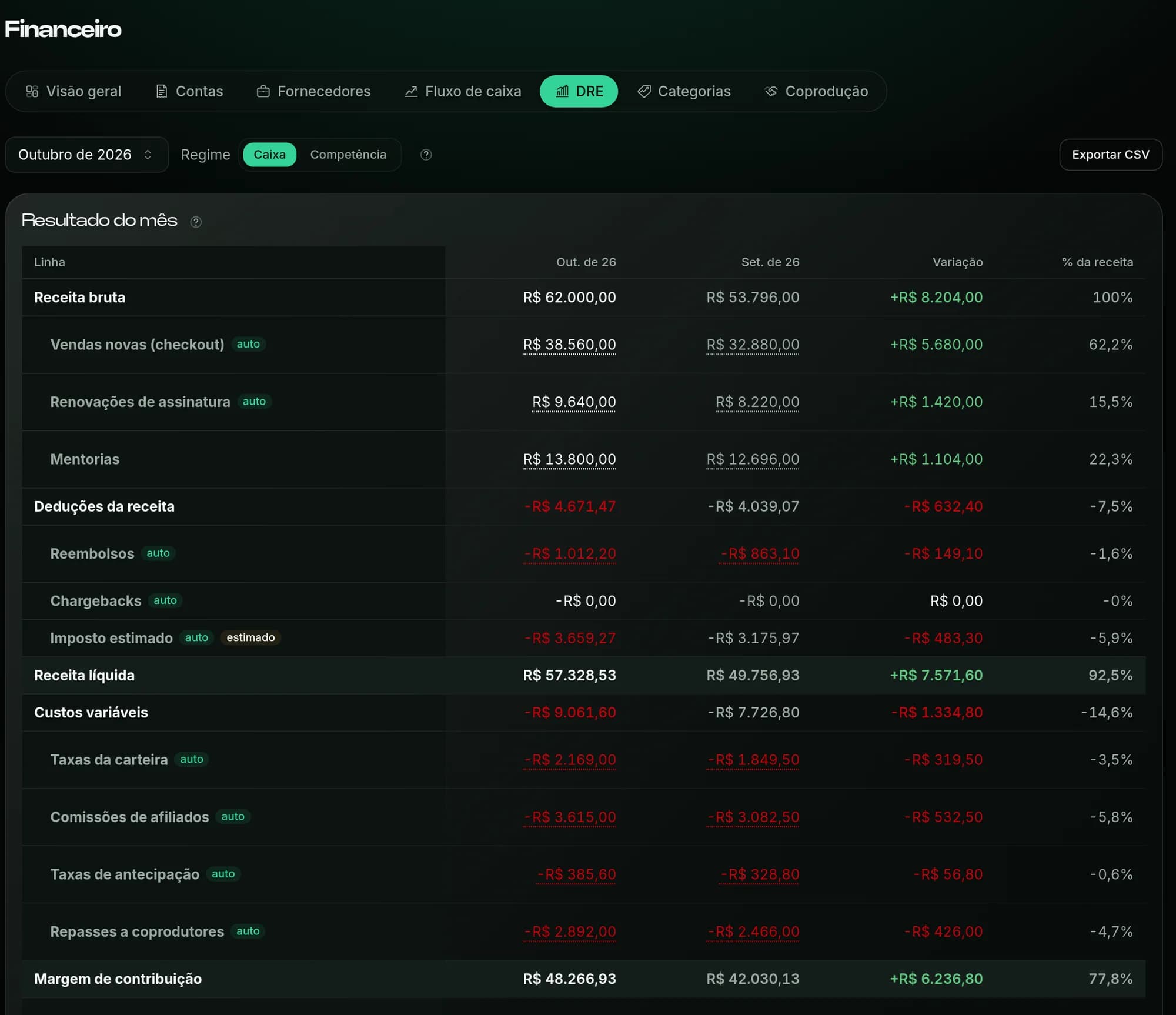
Cash flow shows inflows, outflows and balance, in the past and in the forecast. The P&L shows what was left after refunds, fees, commissions and expenses.
- Daily flow (the month plus 30 days) or monthly (12 months and 3 of forecast).
- The forecast uses open bills and subscription renewals. Nothing is entered by estimate.
- Enter the opening balance in Settings so the balance starts from the right number.
- P&L on a cash or accrual basis, comparing the month with the previous one, with the change and the percentage of revenue.
- Click a P&L value to see the entries behind it.
- Estimated tax from the rate you enter, marked as an estimate.
- Margin per course: how much each course left in the month.
- Export the P&L to CSV.
Suppliers and categories
Everything organized so the P&L comes out right.
Each bill falls into a category and each category falls into a P&L line.
Suppliers
Register who you pay, with a default category and Pix key. See how much you paid in 12 months and how much is still open.
Categories
The default categories come ready. Rename, turn off or create new ones, each tied to a P&L line.
Team access
The owner gives team members access to Finance. Those with access can also receive the due-date notices.
Overdue collections
Who owes you, on a single board.
Delinquency shows up on the overview and becomes a follow-up board.
From overdue to recovered
Move each case through Overdue, Contacted, Negotiating, Promised to pay, Recovered or Lost.
By days late
Filter by 0 to 30 days, 31 to 60 days or more than 60 days and see the student, the product and the amount.
Co-production in the report
Payouts to partners are part of the math.
With co-producers on your products, Finance shows what was paid out.
A line in the P&L
Co-producer payouts become an automatic line in variable costs, already net of refunds.
Co-production tab
Each month's entries sit in a tab of their own, the same list that forms the P&L line. The tab shows up when co-production is on for the school.
Price
What Finance costs.
Finance is a module apart from the plan. The account owner hires it, under Subscription, in the panel.
Finance
12 months free on activation. Then R$97/month.
On the yearly cycle: R$931.20/year
What it includes
- Cash flow and monthly results (P&L)
- Accounts payable and receivable
- Suppliers and categories
- Overdue charges in one place
- Co-production in the report
- No lock-in: cancel whenever you want.
- The free months apply once per school.
- After the free period, billing is automatic. To not continue, turn Finance off before it ends.
- If the free period ends, your data stays saved.
- No Growth needed.
Frequently asked questions
Questions about Finance
Do I have to enter checkout sales?
No. Sales, refunds, fees and commissions come in through the platform rules. You only enter what happens outside the checkout.
Is the cash balance the wallet balance?
The cash balance is an accounting balance: it starts from the opening balance you enter. When the school has the Academy Wallet, its balance shows next to it as information only, and a withdrawal to the bank does not change the cash balance.
Can I use it without an opening balance?
Yes. The balance starts from zero and the numbers show an estimate tag. Enter the balance in Settings to fix it.
Is the P&L tax exact?
It is an estimate from the effective rate you enter in Settings and it is marked as such. If you enter tax by hand in the month, the estimate drops out so it is not counted twice.
What happens after the free months?
Billing is automatic, at the module price. To not continue, turn Finance off before the period ends. Your data stays saved.
Who on the team sees Finance?
The owner and the admins. Team members only see it if you give them access to Finance.
Does the P&L use cash or accrual?
Both. You pick the basis on the screen and compare the month with the previous one.
See your school's cash in one place.
Create your school and turn on Finance whenever you want.
The free months start when you turn the module on.