

Gamification
Those who move forward earn and get noticed.
Points for finished lessons, comments, events and tasks. Levels, badges, a ranking and a store where students trade points for mentoring or content. You decide what is worth how much.
- Points for 11 kinds of action
- Levels, badges and ranking
- Rewards store
Points per action
You choose what earns points.
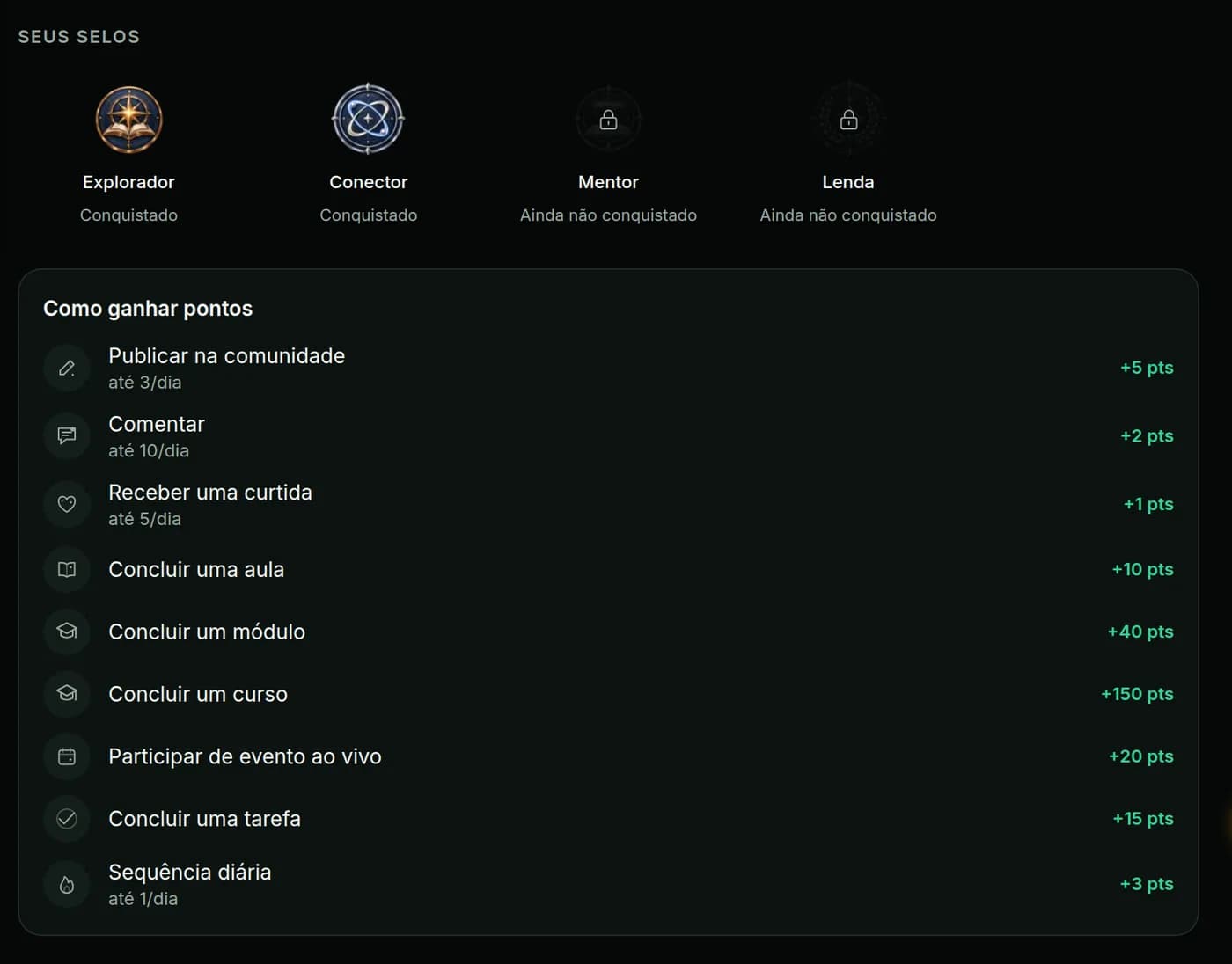
Every student action can earn points, and each action has its own value and daily limit. Points are added automatically, with nothing for you to enter.
Post in the community
When the student publishes a post that stays up.
Suggested: 5 points, up to 3 a day
Comment
Each published comment.
Suggested: 2 points, up to 10 a day
Receive a like
The author earns when another member likes. Liking your own post does not count.
Suggested: 1 point, up to 5 a day
Finish a lesson
Once per lesson and enrollment.
Suggested: 10 points
Finish a module
Once per module and enrollment.
Suggested: 40 points
Finish a course
Once per course and enrollment.
Suggested: 150 points
Enroll in a product
When the student gets access to a product. Also used for badges per product.
Join an access group
Once per student and group.
Attend a live event
When joining the event from the community. Only answering Going earns nothing.
Suggested: 20 points
Finish a task
When the task is completed or approved by the team.
Suggested: 15 points
Daily streak
A bonus for each day the student finishes a lesson, posts or comments.
Suggested: 3 points, 1 a day
What if the rule does not exist?
Create a manual action, such as Helped a classmate, and give points by hand to whoever deserves them. You can also hand out a badge manually.
Levels and badges
Progress you can see.
Points take the student from level to level. Badges mark achievements. Both show beside their name in the community.
- You create as many levels as you want, with a name, point range, color, icon and a description of the perks.
- The level becomes a ring around the student's avatar, in a thin, metallic or glowing style.
- A level can unlock community spaces and the right to post in them.
- Badges for a number of actions, for buying a product or handed out by hand.
- A badge gets its own image or one of the ready icons, and shows beside the name.
Levels in the recommended template
- 1. Explorer0 points
- 2. Participant150 points
- 3. Connector400 points
- 4. Collaborator900 points
- 5. Mentor1,800 points
- 6. Legend3,500 points
Ranking
Healthy competition, per area.
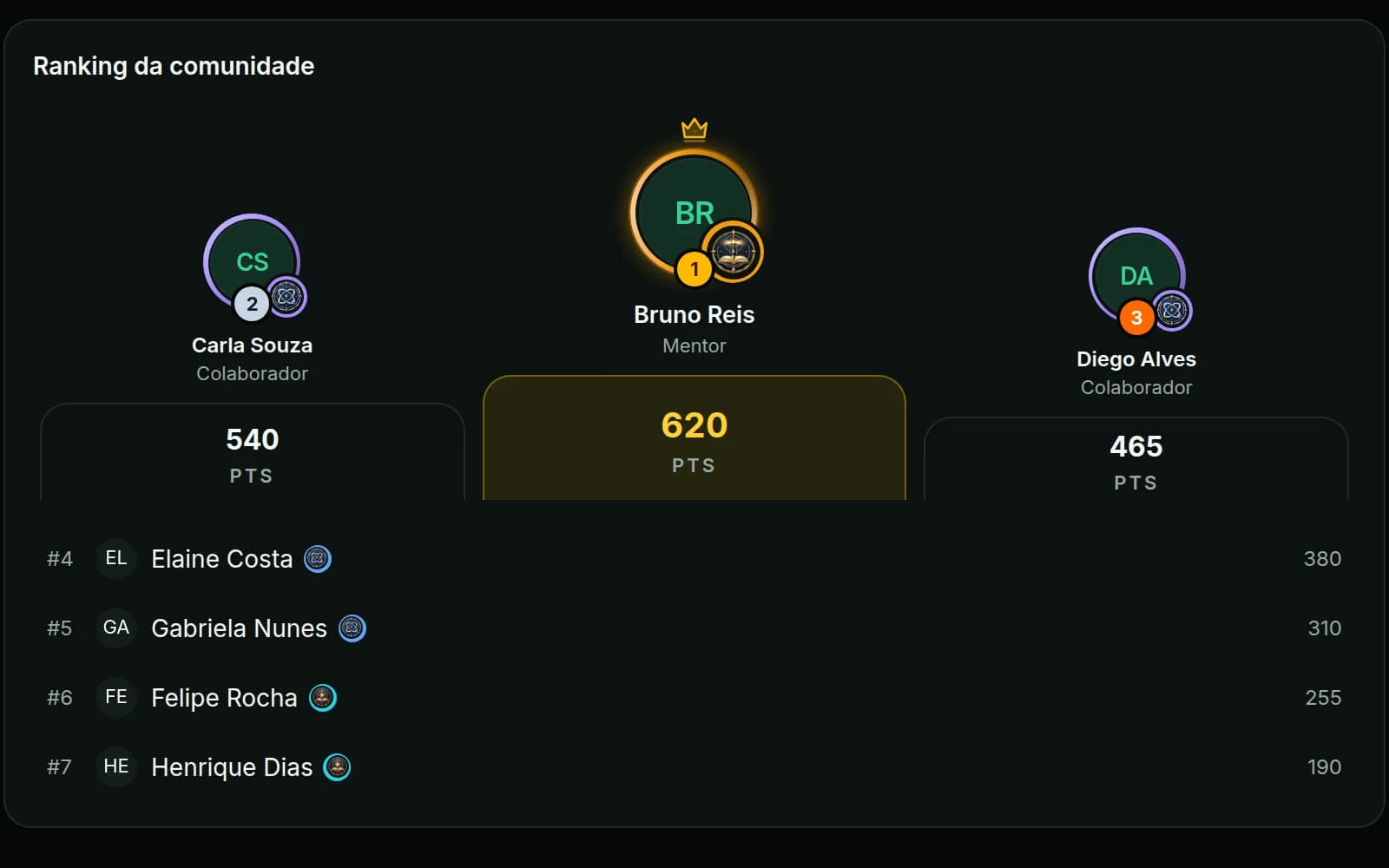
The ranking adds up the last 30 days of points and shows in the community, on its own screen and in the side column of the feed.
Podium and list
The top three on the podium and the next ones on the list, with each person's level and badge.
Your position
Each student sees their own position and their points from the last 30 days, even outside the podium.
On or off per area
The ranking is an option of each members area. If your class does not want competition, leave it off.
Tasks
Tasks that earn points.
Turn participation into habit. You create the task, choose how it is completed and students follow everything on one screen.
Mark as done
A simple task the student ticks off when finished.
Proof with approval
The student sends proof, the team reviews it in a queue and approves. Only the approval gives the points.
Quiz with automatic grading
Up to 20 questions with 2 to 6 options. You set the passing score, 70% by default, and the attempt limit. The answer key never reaches the student.
Deadline and repeat
A single, daily or weekly task, or on chosen dates, with a deadline and a goal. Students see the Today, Week and History tabs.
For whom
All students, an access group, people with a certain badge or one person.
Rewards store
Students trade points for something that matters.
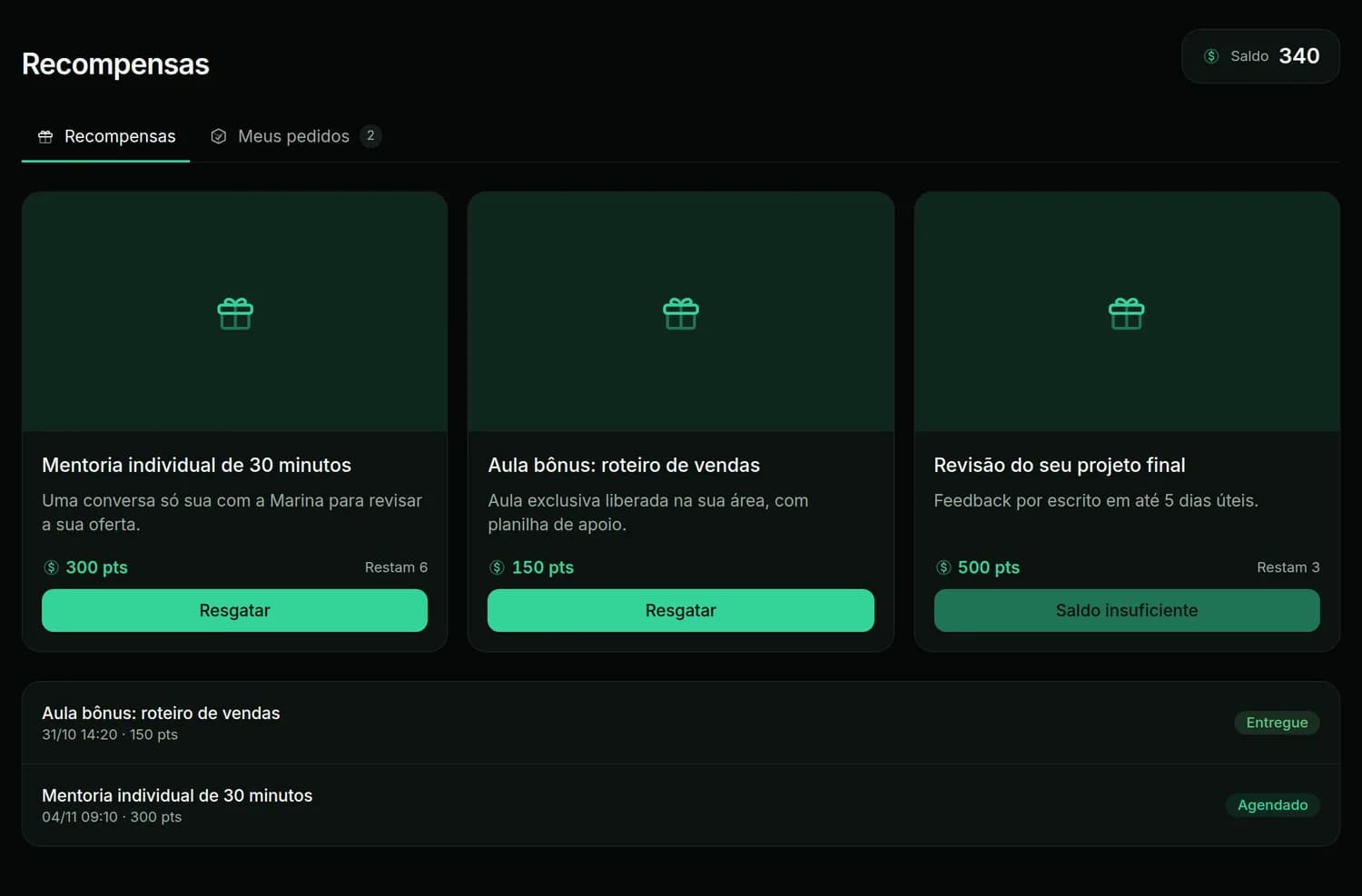
Add mentoring sessions, bonus lessons or other items. Students redeem them with points and your team delivers. Everything is tracked in an order queue.
- Items of three types: session, content or other, with an image, description, price in points and optional stock.
- The store starts off. You turn it on when you have items to offer.
- Redeeming uses a separate wallet. Level and ranking points never go down.
- The wallet receives points from actions with a natural limit, such as lessons, modules, courses, enrollment and likes, or with a daily limit.
- Orders go through pending, scheduled and delivered. If you cancel, the points and the stock come back.
- Delivery is manual. The team schedules the mentoring or unlocks the content.
The store does not sell discounts, coupons or cash. The items are deliveries from your school.
For the student
Everything in one place, so students see themselves progress.
Students follow their own path without asking the team.
My Progress
Finished lessons, products with access and how many are in progress. A list shows the progress of each product and goes straight to the next lesson.
Gamification
Total points, the latest points received with the date and the badges earned.
Ranking
Level, a progress bar to the next level, the podium and the position over the last 30 days.
Tasks
What to do today and this week, with the history of what is done.
Store
Balance, available items and order tracking.
Frequently asked questions
What creators ask.
Can I change what each action is worth?
Yes. Each action has its own value and daily limit and can be turned on or off. The recommended template is only a starting point.
Does spending points in the store lower the student's level?
No. The store uses a separate wallet. Level and ranking keep counting every point earned.
Does the store deliver by itself?
No. Delivery is manual: your team schedules the mentoring or unlocks the content and marks the order as delivered.
Can students cheat with spam?
Each action can have a daily limit, and liking your own post does not count. If the team removes a post, its points are taken back.
Is the ranking mandatory?
No. You turn the ranking on area by area. Points, levels and badges work even with the ranking off.
Do I need the community to use gamification?
Points for lessons, modules and courses work without it. Posting, commenting, liking and events depend on the community.
Is gamification on every plan?
It depends on the plan. The table on the Pricing page shows which plans include gamification.
Give students a reason to come back tomorrow.
Start free, build the members area and turn on gamification when your plan includes it.
No card needed to start on the Start plan.